
Transitions
Transitions are to States as Flows are to Stocks: they move the model between States.
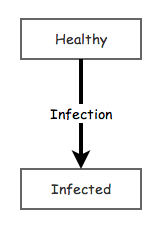
Imagine a simple Agent-Based disease model. In this model each agent might have two States: Healthy and Infected. The agents start in the Healthy State and then transition to the Infected State according to some infection rule. This transition is controlled by a Transition primitive that connects the two states. When the transition is activated, an agent that is in the Healthy State will be moved to the Infected State. A schematic of this simple agent with the two States and a Transition labeled Infection is shown below.
The key configuration option for a Transition is what triggers the Transition. There are three different types of triggers:
- Timeout: A timeout trigger for the infection Transition would switch the healthy person to an infected person at a fixed time after the person became healthy. If all the agents in the model started in the Healthy State. They would all transition at the same time.
- Probability: A probability trigger for the infection Transition would result in a fixed probability of transitioning every unit of time. The probability is the probability of at least one transitioning per time unit. So if the time is specified as years and the probability is 0.5, roughly 50% of healthy agents will become infected every year.
- Condition: The condition trigger allows the creation of a Transition that is based on logical relationships to other agents or events in the model. For instance, a trigger condition equation could be written that looked geographically at nearby agents and would cause a transition if an infected agent was within some nearby radius of susceptibility.
A condition trigger is an equation that is tested each time step; the Transition fires the moment it becomes true. It may test the clock:
Or the value of another primitive:
Transitions are not only for agents. A pair of States with Transitions between them is simply a switch that can flip itself while the model runs.
The model below picks up the tub from the States page and fits it with a float valve, the mechanism a toilet cistern uses to refill itself. The tap is now two States, Tap Open and Tap Closed, with a Transition running each way between them. Close Tap triggers on the condition [Water] >= [Full Mark] and Open Tap triggers on [Water] <= [Empty Mark]. So the tub fills until it reaches the full mark, drains until it reaches the empty mark, and then starts over. The gap between the two marks sets the length of a cycle: raising Full Mark gives the tub further to fill and further to drain back down: